
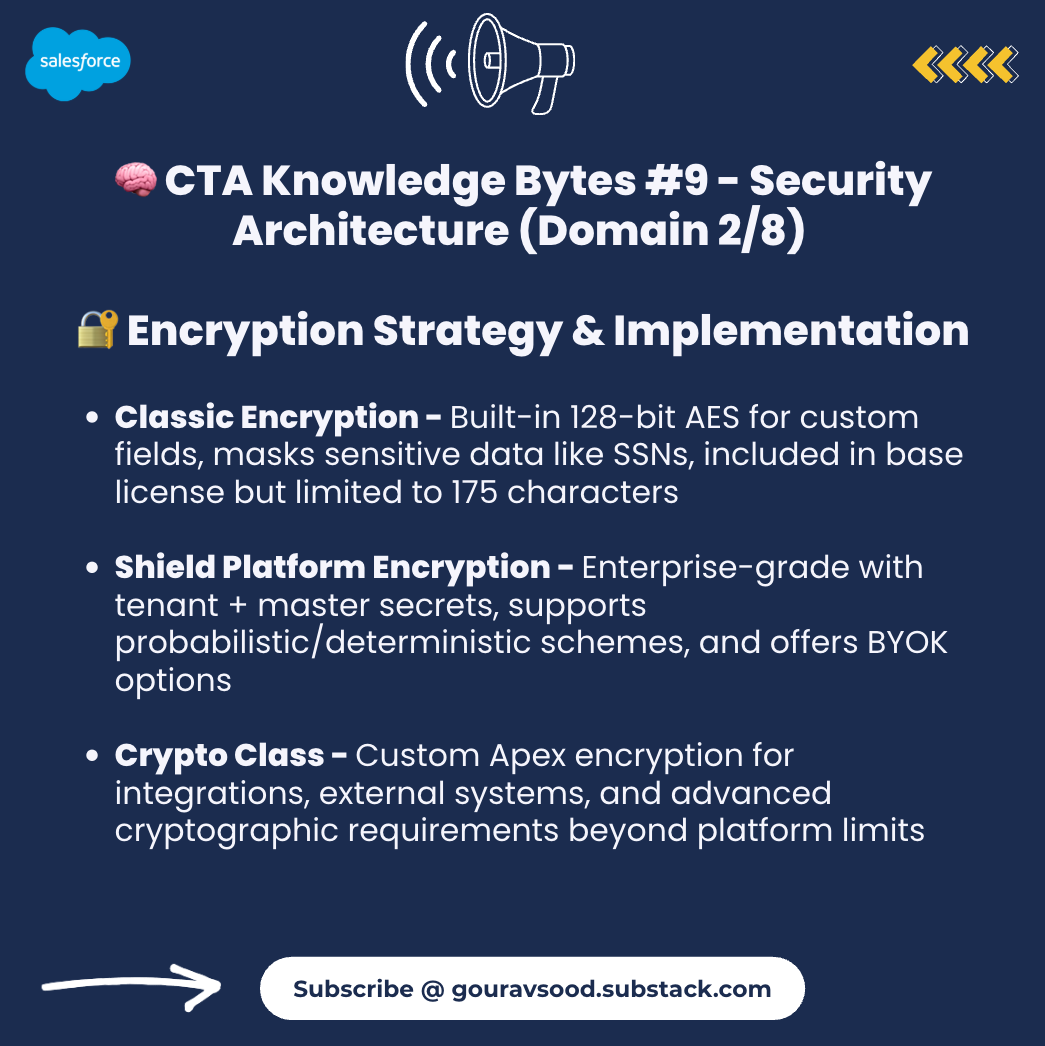
🧠 CTA Knowledge Bytes #9 - Security Architecture (Domain 2/8) - Encryption Strategy & Implementation
Understanding encryption isn't optional for CTAs — it's critical for compliance, security, and client trust.
Here’s your comprehensive encryption architecture guide:
📊 Classic Encryption for Custom Fields
What It Is:
Built-in functionality using 128-bit AES encryption
Creates special encrypted custom text fields (175 char limit)
Provides data masking with random characters
Included in base Salesforce license (no extra cost)
When to Use:
✅ Masking sensitive data from internal users (SSN, credit cards)
✅ Budget constraints (no additional licensing cost)
✅ Simple field-level protection requirements
✅ Custom fields only (standard fields not supported)
Limitations:
❌ Cannot use in formula fields or workflows
❌ Cannot use in validation rules or reports
❌ 175-character limit per field
❌ Manual permission set configuration required
🔑 Shield Platform Encryption Key Functionalities
1. Key Architecture:
Tenant Secret (customer-controlled) + Master Secret (Salesforce-managed) = Data Encryption Key
Key material never shared across orgs
Hardware Security Module (HSM) generates master secret
2. Encryption Schemes:
Probabilistic Encryption (Default):
Same text encrypted repeatedly yields different ciphertext
Stronger security through randomisation
❌ Cannot filter or sort on encrypted fields
Use case: Maximum security for non-searchable data
Deterministic Encryption:
Same text always produces same ciphertext (static IV)
✅ Enables filtering, sorting, and WHERE clauses
Available in case-sensitive or case-insensitive variants
Use case: Encrypted data requiring search/filter capability
3. Key Management Options:
Option A - Salesforce-Generated Keys:
Salesforce generates tenant secret
Combined with master secret for encryption
Easiest implementation path
Option B - Bring Your Own Key (BYOK):
Upload customer-generated tenant secret from external HSM
Customer controls key lifecycle
Enhanced compliance posture
Option C - Cache-Only Key Service:
Store keys externally, Salesforce fetches on demand
Keys never permanently stored in Salesforce
Ultimate customer control
4. Key Rotation:
Regular rotation without data re-encryption
New data uses new key, old data accessible with old key
Critical for security best practices
💻 Using the Crypto Class for Custom Encryption
When to Use Crypto Class:
✅ Custom encryption logic beyond platform capabilities
✅ Integration with external systems requiring specific algorithms
✅ Encrypting data for secure transmission
✅ Creating message authentication codes (MACs)
✅ Generating cryptographic signatures
👉 Subscribe: gouravsood.substack.com
🎯 When to Use Shield Platform Encryption
Compliance Requirements:
✅ HIPAA (healthcare), GDPR (privacy), PCI DSS (payments)
✅ Financial services, government, healthcare industries
✅ Contractual obligations requiring encryption at rest
✅ Data residency and sovereignty requirements
Functional Requirements:
✅ Need to encrypt standard fields (Account Name, Email, etc.)
✅ Encrypt files, attachments, and documents
✅ Use encrypted data in formulas and business logic
✅ Search and filter on encrypted data
✅ SOQL queries on encrypted fields
Key Management Requirements:
✅ Bring Your Own Key (BYOK) for customer-controlled encryption
✅ Regular key rotation policies
✅ Separation of duties for key management
✅ External HSM integration needs
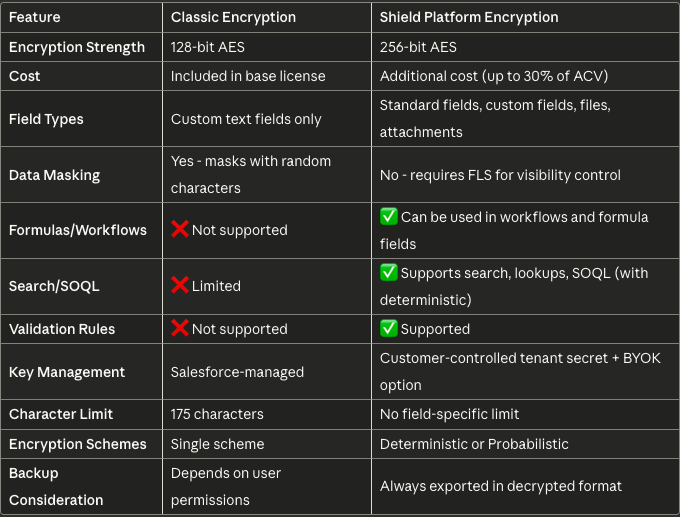
🛡️ Classic vs Shield Platform Encryption Comparison
🏗️ Encryption Architecture Decision Tree
START: Do you need encryption?
  ├─ No → Use Field-Level Security (FLS)
  └─ Yes
      ├─ Custom fields only + budget constraints?
      │   └─ YES → Classic Encryption
      └─ NO
          ├─ Need standard fields/files/attachments?
          │   └─ YES → Shield Platform Encryption
          ├─ Compliance requirements (HIPAA/GDPR/PCI)?
          │   └─ YES → Shield Platform Encryption
          ├─ Need custom encryption logic?
          │   └─ YES → Crypto Class
          └─ Need search/filter on encrypted data?
              └─ YES → Shield (Deterministic Encryption)
🚨 Common Encryption Anti-Patterns
❌ Using Classic Encryption for compliance (insufficient for most regulations)
❌ Over-encrypting data (performance impact + complexity)
❌ Encrypting data needed for business processes (breaks automation)
❌ Not planning for key rotation (security risk)
❌ Hardcoding encryption keys in Apex (major security vulnerability)
❌ Using probabilistic encryption when filtering needed (functionality breaks)
❌ Not testing backup/restore with encrypted data (data recovery risk)
#CTAKnowledgeBytes #SalesforceArchitecture #EnterpriseArchitecture #AI #Agentforce
Salesforce | Salesforce Architecture Talk | Salesforce Partners | Salesforce Architects | Salesforce Admins | Salesforce Developers